
Blog
Modern HTML Best Practices: Building Clean, Accessible, and Fast Websites
HTML is the foundation of the web. While it’s easy to pick up, writing clean, maintainable, and modern HTML takes deliberate practice. Quality HTML improves your site’s search engine visibility, ensures screen readers can navigate your content seamlessly, and makes your codebase a joy to maintain.
Whether you’re building a lightweight static page or a complex web application, following these core best practices will elevate your code standard.
1. Always Declare Document Type & Language
Every HTML document should start with a clean document type declaration and specify the primary language of the document. This prevents browsers from entering “quirks mode” and assists accessibility tools and search engine crawlers.
<!DOCTYPE html>
<html lang="en">
<head>
  <meta charset="UTF-8">
  <meta name="viewport" content="width=device-width, initial-scale=1.0">
  <title>Document Title</title>
</head>
utf-8Encoding: Ensures proper rendering of special characters, emojis, and international text without breaking layout or encoding.Viewport Meta Tag: Essential for modern responsive design on mobile and desktop viewports.
2. Embrace Semantic Elements Over “Div Soup”
Generic <div> tags don’t convey meaning to search engines or assistive technology. HTML5 introduced semantic elements that describe the role of content explicitly.
Instead of nesting multiple <div> tags with custom class names:
<!-- ❌ Avoid generic container clutter -->
<div class="header">
  <div class="nav">...</div>
</div>
<div class="content">
  <div class="article">...</div>
</div>
<div class="footer">...</div>
Use self-describing structural tags:
<!-- ✅ Use clean, meaningful semantics -->
<header>
  <nav>...</nav>
</header>
<main>
  <article>...</article>
</main>
<footer>...</footer>
Key Semantic Tags to Use:
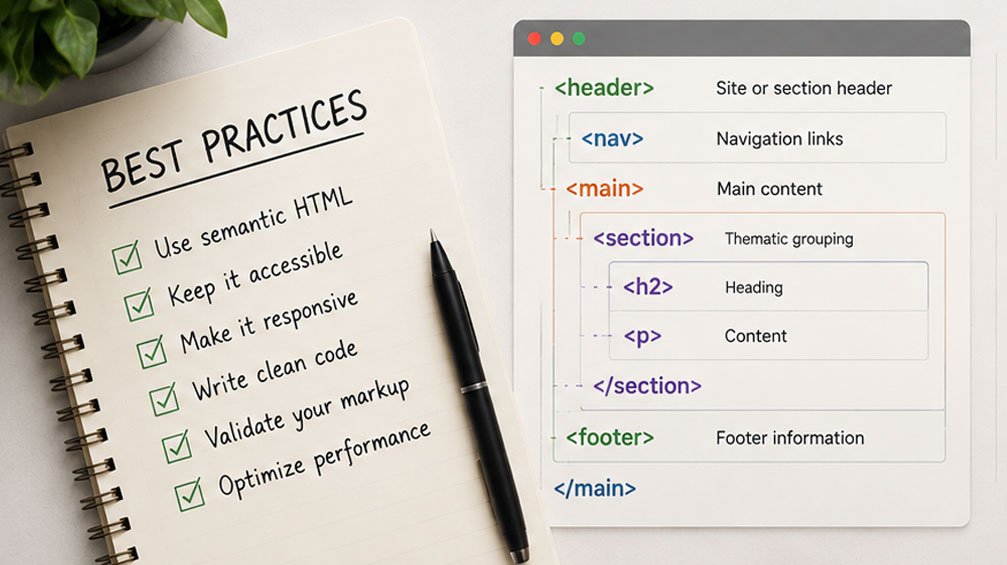
<header>: Page or section branding and navigation headers.<nav>: Major navigation block links.<main>: Primary content unique to the page (only one per page).<article>: Self-contained, redistributable content (e.g., blog posts, cards).<section>: Thematic grouping of content, typically with a heading.<aside>: Tangential content like sidebars, callout boxes, or ads.<footer>: Site or article meta info, copyright, and closing links.
3. Maintain a Strict Heading Hierarchy
Headings (<h1> through <h6>) create a visual and structural outline for your page. They are crucial for SEO ranking and screen reader navigation.
Single
<h1>per page: Reserve<h1>for the primary page heading or post title.Sequential order: Never skip heading levels (e.g., jumping directly from
<h2>to<h4>).Avoid using headings for sizing: Use CSS to control font sizes rather than choosing an
<h4>just because you want smaller text.
<h1>Modern HTML Best Practices</h1>
<h2>1. Document Structure</h2>
<h3>Viewport Meta Configuration</h3>
<h2>2. Semantic HTML</h2>
4. Prioritize Image Accessibility & Performance
Images require proper context and lazy loading optimizations to preserve bandwidth and loading speeds.
<!-- ✅ Accessible and performance-optimized -->
<img
  src="hero-banner.jpg"
  alt="A clean workstation setup with a laptop displaying code"
  width="1200"
  height="600"
  loading="lazy"
>
5. Build Accessible Forms
Forms are a critical touchpoint for user interaction. Every input field needs a matching <label> element so screen readers can announce what information is expected.
<!-- ✅ Explicitly associated label and input -->
<div class="form-group">
  <label for="user-email">Email Address</label>
  <input
    type="email"
    id="user-email"
    name="email"
    placeholder="you@example.com"
    required
  >
</div>
Use specific
typeattributes (email,tel,number,url) to trigger optimized touch keyboards on mobile devices.Use
aria-describedbyoraria-invalidwhen providing error messaging or instructions.
6. Optimize Script & Style Loading
Keep render-blocking resources to a minimum to ensure fast page render times.
Place external CSS stylesheets in the
<head>tag.Load non-critical JavaScript using
deferorasynctags before</body>to prevent delaying DOM parsing.
<head>
  <link rel="stylesheet" href="styles.css">
  <script src="app.js" defer></script>
</head>
Summary Checklist
Valid Doctype:
<!DOCTYPE html>at the top of every document.Language Attribute:
<html lang="...">defined.Semantic Tags:
<main>,<article>,<header>, and<nav>over extra<div>elements.Logical Headings: Structured
<h1>through<h6>without skipping levels.Alt Attributes: Informative descriptions on all meaningful images.
Accessible Forms: Explicit
<label>elements connected viaforandid.Performance Attributes: Native
loading="lazy"on images anddeferon scripts.